

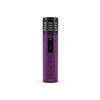
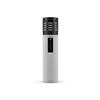


Original Arizer Extreme Q Remote Control: How to Use + Best Deals in the USA
If you’ve owned an Arizer Extreme Q for any amount of time, you already know how convenient the remote control is. Being able to change temperature, adjust fan speed, or power the unit on and off without getting up sounds small until your remote stops working or disappears.
That’s usually the moment people start searching for an Arizer Extreme Q remote control replacement. Whether yours is lost, damaged, or simply worn out, having an authentic Arizer remote makes a real difference in daily use.
This guide breaks down everything you need to know about the Arizer Extreme Q remote control, including how to use it, troubleshoot common issues, compatibility with newer models, and where to buy an original remote in the USA at the best price.
What Is the Arizer Extreme Q Remote Control?

The Arizer Extreme Q remote control is an official accessory designed for Arizer’s desktop vaporizers. It allows you to control temperature, fan speed, and power settings from across the room. For many users, it’s one of the most underrated but essential Arizer desktop dry herb vaporizer accessories.
Instead of walking over to the unit mid-session, you can fine-tune your experience with a few button presses. That convenience is exactly why replacing a missing or broken remote becomes a priority.
What Does the Arizer Extreme Q Remote Control Do?

The remote gives you full control over the core functions of the Extreme Q. You can raise or lower the temperature, turn the unit on or off, and control the fan speed for whip or balloon use. These features are especially useful during longer sessions or when sharing with friends.
Many long-time users say the remote turns the Extreme Q into a truly remote-controlled desktop vaporizer, rather than just a stationary device.
How to Use the Arizer Extreme Q Remote Control

If you’ve never used the remote before, it’s surprisingly simple. Once batteries are installed, the remote works right out of the box with compatible units.
Use the power button to turn the vaporizer on or off, the temperature buttons to adjust heat levels, and the fan controls to change airflow speed. Most users find that adjusting fan speed from the couch is one of the most convenient features, especially when filling bags.
Arizer Extreme Q Remote Buttons Explained

Each button on the remote has a clear purpose, and Arizer kept the layout straightforward. Temperature controls let you fine-tune heat levels, while fan buttons manage airflow intensity. The power button does exactly what you’d expect.
For new users, it only takes one or two sessions to feel completely comfortable using the remote.
Arizer Extreme Q Remote Not Working? Common Fixes

One of the most searched topics online is “Arizer Extreme Q remote not working.” In many cases, the issue is simple. Dead batteries are the most common culprit. The remote uses standard batteries, which makes replacements easy.
If battery replacement doesn’t solve the problem, make sure nothing is blocking the signal between the remote and the unit. If the remote still doesn’t respond, it’s usually time for an Arizer remote control replacement part.
Arizer Extreme Q Remote Control Battery Type

The Arizer Extreme Q remote control uses standard batteries, which are widely available in the USA. This makes it easy to keep a spare set on hand and avoids the frustration of proprietary battery packs.
Always remove batteries if you’re storing the remote long-term to prevent corrosion.
Is the Arizer XQ2 Remote Control Compatible?

Many people wonder if the Arizer XQ2 remote control works with the Extreme Q. While both remotes look similar, compatibility depends on the specific model and generation. The XQ2 uses updated electronics, and its remote is designed specifically for that system.
For best results, always buy the remote labeled for your exact model.
Why Buy an Original Arizer Remote Control?

There are aftermarket remotes available, but most experienced users recommend sticking with an authentic Arizer replacement remote. Original remotes respond more reliably, pair correctly with the unit, and last longer.
When it comes to best Arizer replacement parts, the remote is one accessory where quality truly matters.
Where to Buy Arizer Extreme Q Remote Control in the USA

If you’re looking to buy Arizer Extreme Q remote replacement USA, it’s important to shop with trusted sellers. Original remotes are available online and ship across New York, including Albany, Buffalo, Rochester, Syracuse, Utica, Yonkers, Schenectady, and New Rochelle.
For reliable stock, fast shipping, and competitive pricing, DryHerbsVaporizer is a solid option. The site carries authentic Arizer parts and accessories, including the Arizer Extreme Q remote control for sale, often with special deals and free shipping offers. It’s a go-to choice for users who want genuine parts without the hassle.
Arizer Extreme Q Remote Control Price in USA

The Arizer Extreme Q remote control price in the USA typically falls in a reasonable range for an official replacement part. Prices may vary depending on availability and promotions, but original remotes are generally affordable compared to replacing the entire unit.
Watching for bundle deals or seasonal discounts can help you get the Arizer Extreme Q remote best price.
Best Deals on Desktop & Portable Vaporizers in the USA

If you’re already shopping for original Arizer accessories, it’s worth checking out the current deals at DryHerbsVaporizer, especially during their Holiday Sale where you can save up to 25% on a wide range of vaporizers and accessories. Along with authentic Arizer replacement parts, the site features popular portable options like the Wulf Mods LX Slim Portable Dry Herb Vaporizer, which is a great budget-friendly choice for everyday use. It’s compact, easy to use, and ideal for anyone who wants a simple dry herb vaporizer without extra setup. You’ll also find premium options like the PAX Plus Vaporizer Kit, a favorite among US users for its sleek design, long battery life, and versatility with both dry herbs and concentrates. What makes this sale stand out is that all products are clearly listed as authentic, pricing is competitive, and shipping is fast across the USA. Whether you’re replacing an Arizer Extreme Q remote control or upgrading to a new portable vaporizer, this collection makes it easy to grab reliable gear at a discounted price before stock runs out.
Final Thoughts
The Arizer Extreme Q remote control might seem like a small accessory, but once you’ve used it, it’s hard to go without. From temperature adjustments to fan speed control, it adds comfort and convenience to every session.
If your remote is lost or no longer working, replacing it with an original Arizer remote is one of the easiest ways to restore your desktop vaporizer to its full potential.
FAQs: Arizer Extreme Q Remote Control
1. Does the Arizer Extreme Q remote control really make a difference?
Yes, many users on Reddit say the remote makes daily use much more comfortable. Being able to adjust temperature and fan speed without getting up is especially helpful during long sessions or group use.
2. Why is my Arizer Extreme Q remote control not working?
According to Amazon and Google Q&A sections, the most common reason is dead or weak batteries. If new batteries don’t fix it, users suggest checking for signal obstruction or replacing the remote if it’s physically worn out.
3. Can I use the Arizer Extreme Q without the remote?
Yes, Quora users often mention that the Extreme Q can be fully operated from the unit itself. However, the remote adds convenience and makes fine adjustments much easier.
4. What batteries does the Arizer Extreme Q remote use?
Most Google search results confirm that the remote uses standard, easy-to-find batteries. This makes replacements simple and inexpensive compared to proprietary battery systems.
5. Is the Arizer XQ2 remote control compatible with the Extreme Q?
This is a popular Reddit question. While the remotes look similar, compatibility depends on the model. Most users recommend buying the remote specifically designed for your device to avoid pairing issues.
6. Is it better to buy an original Arizer remote or a third-party one?
Amazon reviews strongly favor original Arizer remotes. Users report better responsiveness, longer lifespan, and fewer connection problems compared to third-party alternatives.
7. How long does an Arizer Extreme Q remote control usually last?
Based on long-term Reddit user feedback, an original Arizer remote can last several years with normal use, especially if batteries are replaced regularly and removed during long storage.
8. Where is the best place to buy an Arizer Extreme Q remote control in the USA?
Google and Quora users commonly recommend authorized US-based vape retailers. These stores usually offer authentic Arizer remotes, faster shipping, and better customer support than unknown sellers.